
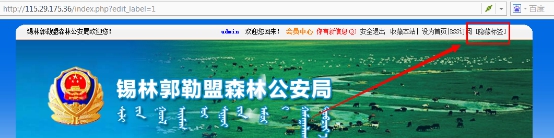
1、先登陆网站后台,点击“显示标签”
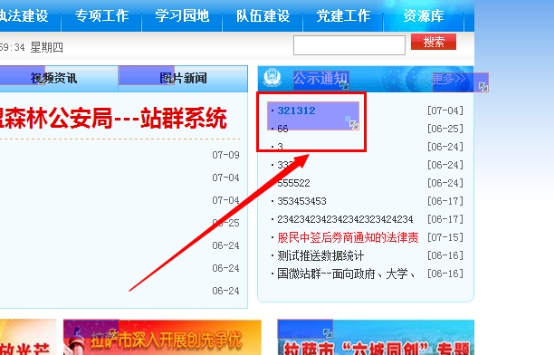
标签1:
A、双击标签,进入标签设置
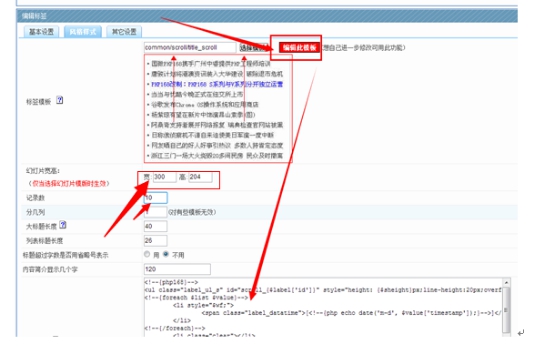
2、点击编辑此模板----在下面的框中,删除现在的代码;然后将下面我们提供的代码复制进去,另外幻灯片的宽高,按图片提供的:300和204,最后提交即可。
参考代码:就是复制下面的代码
<!--{php168}-->
<ul class="label_ul_s" id="scroll_{$label['id']}" style="height: {$sheight}px;line-height:20px;overflow:hidden">
<!--{foreach $list $value}-->
<li style="$wf;">
<span class="label_datatime">[<!--{php echo date('m-d', $value['timestamp']);}-->]</span>·<a href="$value[url]" target="_blank" title="$value[full_title]">$value[title]</a>
</li>
<!--{/foreach}-->
<li class="clear"></li>
</ul>
<script type="text/javascript">
(function(){
var this_Scroll = document.getElementById("scroll_{$label['id']}");
this_Scroll.innerHTML+=this_Scroll.innerHTML;
var ScrollTimer=0;
var MyMar = setInterval(Scroll,2500);
this_Scroll.onmouseover=function(){ clearInterval(MyMar) };
this_Scroll.onmouseout=function(){ MyMar=setInterval(Scroll,2500) };
function Scroll(){
this_Scroll.scrollTop++;
if(parseInt(this_Scroll.scrollTop)%20!=0) {
ScrollTimer=setTimeout(Scroll,10);
}else{
if(parseInt(this_Scroll.scrollTop)>=parseInt(this_Scroll.scrollHeight)/2) {
this_Scroll.scrollTop=0;
}
clearTimeout(ScrollTimer);
}
}
})()
</script>
<!--{/php168}-->
标签二:
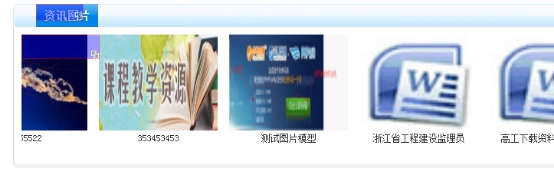
A、同样也是双击标签,复制代码进入。红框的设置如图设置。
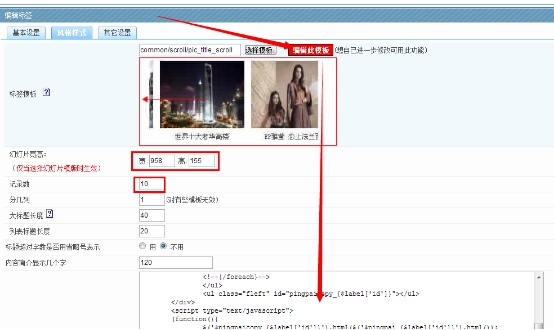
B、点击基本设置,选择图片
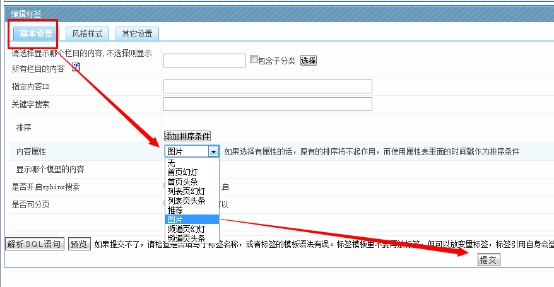
复制的代码参考如下:
<!--{php168}-->
<div class="layer" style="height:{$sheight}px;width:{$swidth}px;overflow:hidden" id="pingpaibox_{$label['id']}">
<div id="scroll_{$label['id']}" style="width:800%">
<ul class="label_pic_ul fleft" id="pingpai_{$label['id']}">
<!--{foreach $list $value}-->
<li style="float:left;display:inline-block; margin:0 15px 0 0;">
<a href="$value[url]" target="_blank" title="$value[full_title]"><img width="{$sheight}" height="{$sheight}" alt="$value[full_title]" onload="this.height=this.width-30" src="{if empty($value['frame'])}{$RESOURCE}/images/nopic.jpg{else}$value[frame]{/if}" /></a>
<p class="label_pic_title2 center" style="width:{$sheight}px;"><a href="$value[url]" target="_blank" title="$value[full_title]">$value[title]</a></p>
</li>
<!--{/foreach}-->
</ul>
<ul class="fleft" id="pingpaicopy_{$label['id']}"></ul>
</div>
<script type="text/javascript">
(function(){
$('#pingpaicopy_{$label['id']}').html($('#pingpai_{$label['id']}').html());
var MyMar=setInterval(Marquee,20);
$('#scroll_{$label['id']}').hover( function(){ clearInterval(MyMar) }, function(){ MyMar=setInterval(Marquee,20) } );
function Marquee(){var tab=$('#pingpaibox_{$label['id']}')[0], tab1=$('#pingpai_{$label['id']}')[0],tab2=$('#pingpaicopy_{$label['id']}')[0];
if(tab2.offsetWidth-tab.scrollLeft<=0)tab.scrollLeft-= tab1.offsetWidth;else{tab.scrollLeft++;}}
})()
</script>
</div>
<!--{/php168}-->

Copyright©www.php168.net all rights reserved 粤ICP备11009525号-1Powered by 国微CMS Code 2003-2025 PHP168 S 广州国微软件科技有限公司